Verified Laboratory MATLAB Implementation
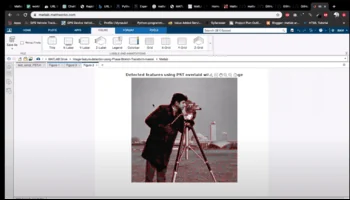
Image feature detection using Phase Stretch Transform in MATLAB
Discover how to use Phase Stretch Transform (PST) in MATLAB for robust image feature detection. Learn to identify edges and patterns effectively. Get started...
MATLAB Laboratory Run Demonstration
100% Tested
Environment: MATLAB R2024b / R2026 Compatible
Deliverables: .m scripts, .slx models, .mat data
Validation: Verified simulation plots & GUI App
Documentation: Full IEEE formatted project report
Project Methodology & Algorithm Details
What is Phase Stretch Transform (PST)?
- PST is an operator that identifies features in an image.It takes an intensity image as input and returns a binary image of the same size, with 1s where sharp transitions (such as edges and corners) are detected and 0s elsewhere.PST emphasizes edge information by applying a nonlinear frequency-dependent phase to the image. PST is a computational approach used for signal and image processing, particularly in feature detection and classification. Here are the key points about PST:PST is related to the time stretch dispersive Fourier transform.It transforms an input image by emulating propagation through a diffractive medium with an engineered 3D dispersive property (refractive index).In the context of feature enhancement in digital images, PST follows these steps:
- Spatial Filtering: The input image is first filtered with a spatial kernel.
- Nonlinear Frequency-Dependent Phase: A nonlinear frequency-dependent phase is applied to the filtered image.
- Output: The transformed image represents the phase in the spatial domain.
- Emphasis on Edges and Corners: Higher-frequency features (such as edges and corners) receive more phase, emphasizing edge information.
- Thresholding and Morphological Operations: Further enhance features by applying thresholding and morphological operations.
- PST is a pure phase operation, unlike conventional edge detection algorithms that operate on amplitude.
- It can be thought of as performing a similar function as phase-contrast microscopy but on digital images
Steps to Implement PST in MATLAB:
- Load the Input Image:
- Begin by loading the image you want to analyze.
- Preprocess the Image (if necessary):
- Depending on the quality of your input image, consider preprocessing steps such as noise reduction, contrast enhancement, or resizing.
- Compute the Phase Stretch Transform:
- Apply the PST to the preprocessed image.
- The main step involves the 2D phase function (PST phase kernel), which is typically applied in the frequency domain.
- Higher-frequency features (edges, corners) receive more phase, enhancing their visibility.
- Enhance Features in the Transformed Image:
- The transformed image obtained from PST may still contain noise or artifacts.
- You can further enhance features by applying thresholding or morphological operations.
- Threshold the Transformed Image:
- Set an appropriate threshold to distinguish features from background.
- This step converts the transformed image into a binary representation of detected features.
- Display the Results:
- Visualize the original image alongside the detected features.
Need the Complete Source Code & Report for This Project?
Get fully documented code, dataset, and step-by-step guidance before your academic deadline.
15-Min Response
Customize This Project
Direct review by PhD Lead Engineer
Related Project Demos



Need Custom Engineering Code?
Our PhD engineers provide complete MATLAB/Simulink projects with verified test cases and IEEE reports.
Order Project Solution →